36 VN Engine
A downloadable browser extension
Turn ChatGPT conversations into a visual novel experience
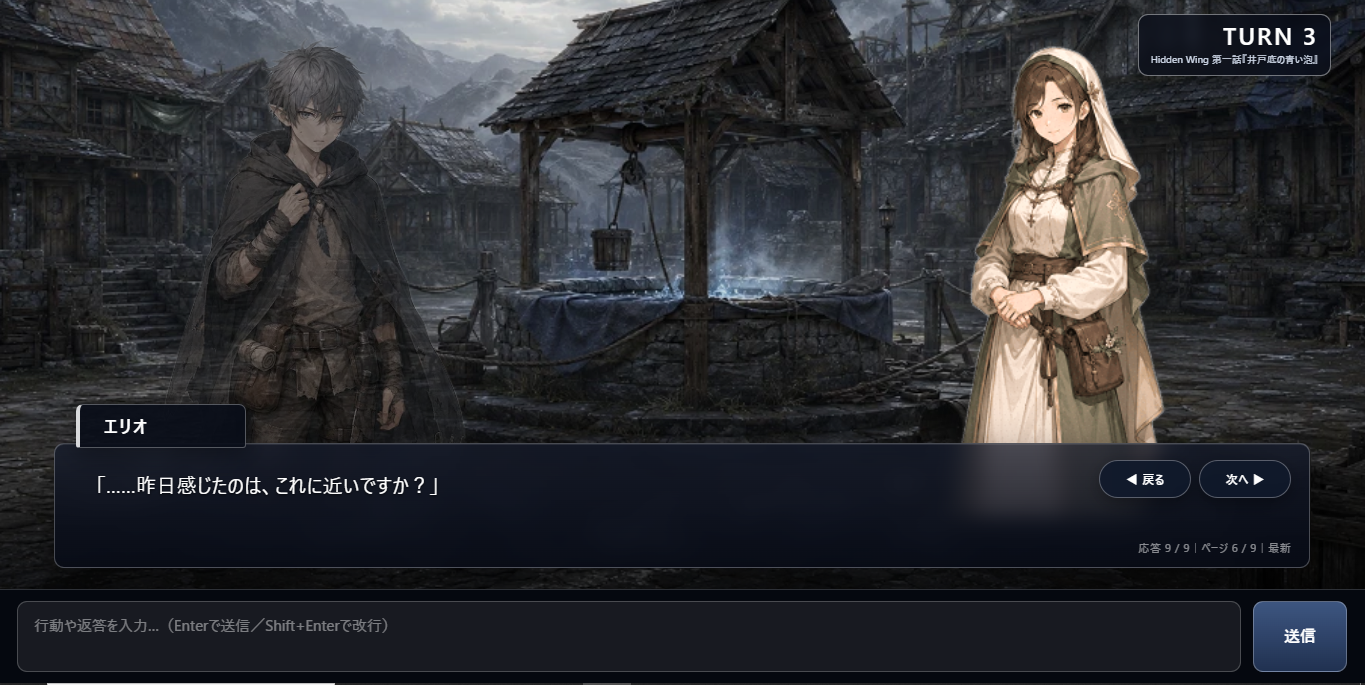
36 VN Engine is a free browser extension that transforms ChatGPT-based stories, text RPGs, and TRPG sessions into an interactive visual novel-style presentation.
Display character portraits, backgrounds, dialogue windows, music, visual effects, choices, battle information, and session records directly over your ChatGPT conversations—without using an external API.
Key Features
• Visual novel-style dialogue presentation • Character portrait and background management • Background music playback with seamless looping • Emotion and battle visual effects • Interactive choice presentation • Persistent conversation backlog • Session records and turn management • Character and world database • PC status, inventory, skills, and magic management • Reusable game packs for TRPG rules, scenarios, and world guides
Included Sample Game Pack
The package includes Ashes of Living: Hidden Wing – Episode 1, a playable Japanese TRPG sample containing rules, a world guide, session setup documents, character portraits, backgrounds, and music.
Requirements
• Desktop Google Chrome • A ChatGPT account • Developer Mode enabled on the Chrome extensions page
No OpenAI API key is required. Availability of ChatGPT features, file uploads, and usage limits depends on your ChatGPT plan and workspace settings.
AI Disclosure
This project was developed collaboratively with generative AI. Its distributed package contains AI-assisted code, text, graphics, and music, all reviewed, edited, tested, and assembled by 36 STEELO.
Important Notice
36 VN Engine is an independent browser extension created by 36 STEELO. It is not an official OpenAI product and is not affiliated with or endorsed by OpenAI.
Current release language: Japanese Version: v1.1.1-hotfix License: MIT License Price: Free / Pay what you want
Official website: https://36steelo.com X: https://x.com/JamminFunkness
36 VN Engineについて
36 VN Engineは、ChatGPT上で展開される物語、テキストRPG、TRPGセッションを、立ち絵・背景・BGM・台詞ウィンドウ・選択肢・戦闘演出などを備えたビジュアルノベル形式で楽しめる無料ブラウザ拡張機能です。
会話バックログ、セッション記録、ターン管理、人物・背景データベース、PCステータス、ゲームパック管理など、長期的なAI物語体験を支える機能も搭載しています。
無料サンプルゲームとして、国産ダークファンタジーTRPG「Ashes of Living:Hidden Wing 第一話」を収録。インストール後、登録済みのルール・世界観・シナリオ・各種アセットを使って動作を体験できます。
本作は36 STEELOが独自に開発した非公式拡張機能であり、OpenAIの公式製品ではありません。
Download
Install instructions
Installation / インストール方法
- Download the ZIP file and extract it to a permanent folder.
- Open chrome://extensions/ in Google Chrome.
- Enable Developer mode.
- Click Load unpacked.
- Select the extracted folder containing manifest.json.
- Open or reload chatgpt.com.
- Press Esc to open the 36 VN Engine menu, then enable VN Mode.
Important: Do not delete or move the extracted folder after installation. Chrome loads the extension directly from this folder.
Recommended browser: Google Chrome Also tested: Microsoft Edge and Avast Secure Browser Required: A ChatGPT account OpenAI API key: Not required
日本語
- ダウンロードしたZIPファイルを任意の保存場所へ展開します。
- Google Chromeで chrome://extensions/ を開きます。
- 画面右上のデベロッパーモードを有効にします。
- 「パッケージ化されていない拡張機能を読み込む」を選択します。
- manifest.jsonが入っている展開済みフォルダーを指定します。
- ChatGPTを開くか、既に開いているChatGPTタブを再読み込みします。
- Escキーでメインメニューを開き、VNモードを有効にします。
重要:インストール後も展開済みフォルダーは削除・移動しないでください。Chromeはそのフォルダーから拡張機能を読み込みます。
推奨ブラウザ:Google Chrome 動作確認済み:Microsoft Edge/Avast Secure Browser ChatGPTアカウントが必要です。OpenAI APIキーは必要ありません。
Leave a comment
Log in with itch.io to leave a comment.